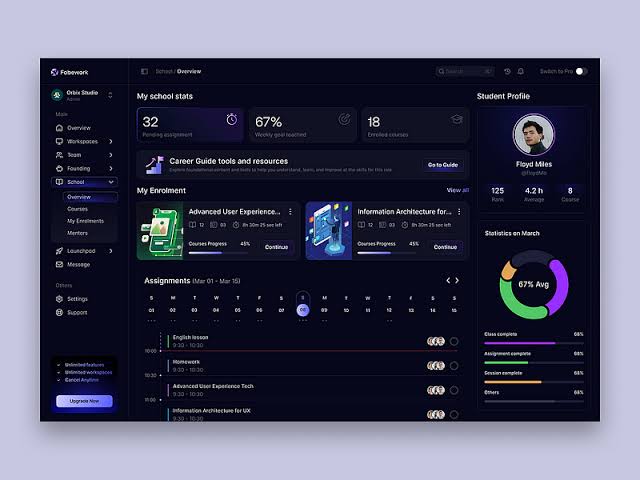
Admin dashboards have evolved into powerful tools that enable businesses to manage processes, analyze metrics, and make informed decisions with unparalleled efficiency. Adopting the latest design techniques is vital to ensure your dashboard remains functional, intuitive, and visually engaging for diverse users. For inspiration and best practices in admin dashboard UI design, reviewing examples from industry-leading templates can help spark ideas for your next project.
As technology advances, user expectations for dashboards have shifted. Administrators now require experiences that are personalized, visually organized, and accessible from any device, at any time. Creators must therefore prioritize usability, performance, and adaptability in their designs.
It is also valuable to keep an eye on larger trends in user interface design, as covered by sources like UX Collective, to ensure your dashboards align with broader industry standards.
Bento Grid Architecture
The Bento Grid is redefining dashboard layouts with its modular tile approach. By breaking down the interface into clear, high-contrast sections, information becomes accessible at a glance. Each data widget or functional area is assigned its own distinct zone, reducing cognitive overload and helping users process complex information with clarity. The grid layout also accommodates flexibility, allowing designers to rearrange content quickly based on user priorities or business needs.
This architectural philosophy also aligns with current trends in responsive design. When executed well, a Bento Grid enables dashboards to adapt to varying data sets and business logic without sacrificing usability. As teams grow and organizations expand, the grid enables seamless addition or removal of widgets, allowing the admin UI to evolve organically with the company’s needs.
Intentional Minimalism
Minimalism in dashboard design is about more than simply removing elements. It involves creating a laser focus on what matters most to the user. Modern dashboards use neutral colors, limited ornamentation, and subtle depth effects such as soft shadows to highlight hierarchy without visual clutter. This design approach ensures an uninterrupted workflow and brings forward essential actions, making everyday management more productive.
Intentional minimalism doesn’t mean sacrificing functionality for aesthetics. Instead, it involves careful prioritization: employing iconography, whitespace, and concise textual elements to guide the user’s eye toward core functions. Dashboards that follow minimalist principles often include easily skimmable summaries and actionable cards for users pressed for time, providing a seamless, non-distracting path to insights.
Zero-Latency UI
Performance is now a non-negotiable requirement for any dashboard. Using advanced web technologies, such as Angular or React, enables designers to create interfaces where every interaction is swift and smooth. Partial hydration and client-side rendering minimize delays, making the UI feel as responsive as a native application. This approach not only delights users but also builds trust in mission-critical environments where immediate feedback is crucial.
Reducing latency not only affects how quickly information loads but also the perception of control and fluidity users experience. Sophisticated caching and prefetching strategies, coupled with optimistic UI updates, can make data appear to update in real time—even before server responses are complete. Prioritizing these techniques ensures your dashboard feels frictionless even under peak loads or mobile network conditions.
Universal Admin-on-the-Go
The distinction between devices is vanishing. Today’s dashboards adapt to all screen sizes, from wall-mounted monitors in operations centers to handheld smartphones used by roaming team members. Smart layout systems adjust icons, data density, and interaction modes based on device context. For example, touch-first gestures and voice controls can be enabled on mobile while maintaining rich visuals on desktop environments, ensuring consistent usability wherever your administrators go.
This responsive philosophy acknowledges that business doesn’t pause for device restrictions. Whether users are approving transactions in transit, responding to alerts in the field, or monitoring metrics from home, an adaptive dashboard streamlines every task. Integrating cross-device notifications and seamless multi-session experiences can further ensure that no critical update slips through unnoticed, cementing the dashboard as an indispensable operational tool.
Hyper-Personalization
Increasingly, admin dashboards enable users to tailor their experiences dramatically. Through customizable widgets, dynamic themes, and personalized data feeds, administrators see only what is relevant to their roles and preferences. AI-driven suggestions and learning-driven dashboards also play a role, ensuring that evolving user needs are anticipated. This shift toward hyper-personalization drives both higher engagement and improved efficiency, as users are empowered to focus on their specific workflows.
Looking forward, personalization is increasingly moving from static user settings to adaptive systems powered by machine learning. Dashboards can proactively surface crucial insights or actions based on historical behavior, seasonal trends, and even organizational changes. Admins are thus spared time spent on manual configuration and can trust their tools to support not only current routines but also emerging priorities.
Modular Components
Reusable component libraries and low-code platforms have made it easier than ever to create dashboards with modular drag-and-drop widgets. Users can configure tables, charts, and summary panels to fit their current priorities, or start with proven templates for rapid deployment. As business logic becomes more complex, modular components enable scaling functionality without redesigning the entire dashboard from scratch. This approach encourages continuous iteration and effortless scaling as business needs evolve.
Leveraging modular components also enhances testing and maintainability. Each component can be developed, updated, and improved independently, leading to shorter cycle times for new features and bug fixes. Organizations adopting component-driven development discover greater flexibility in theming and localization, ensuring the dashboard can easily accommodate growth into new markets or business units.
Generative UI
Generative UI takes adaptability to the next level by dynamically composing dashboard interfaces at runtime. By analyzing user roles, recent behavior, and contextual business rules, the system can present interfaces that morph to deliver the precise controls and insights needed at any given time. This intelligent automation reduces development time, streamlines onboarding for new features, and ensures that every administrator, regardless of experience, can access the most relevant tools instantly.
This form of advanced UI orchestration can automatically adapt to both technical and non-technical users. For example, professional analysts may be given access to more advanced data exploration tools, while new team members may see simplified overviews. Integrating generative UI patterns reduces learning curves, enhances accessibility, and supports ongoing organizational evolution in a fast-changing digital environment.
Conclusion
As admin dashboards become central to business operations, staying updated with design trends is crucial. Whether redesigning or creating a new system, prioritizing clarity, speed, and adaptability ensures maximum value. Investing in bento grid layouts, minimal interfaces, fast interactions, universal access, deep personalization, modularity, and generative UI empowers teams and streamlines decisions. Incorporate these principles for scalable platforms that adapt to technology and user needs. Regular analytics review helps identify bottlenecks and preferences, and experimenting with new patterns keeps dashboards effective. The best admin dashboards combine strong functionality with user-friendly experiences, balancing performance and clarity amid changing business landscapes.